Project Muxley
project goals
Set up a home network in order to:
- First, in order to be able to just vpn into the home network
- Then to be able to control a robot with a camera and microphone to spy on parker
- Then to be able to water the plants
- then?
Wants
I want a writing laptop, one thats comfy to code on, and also dockable to monitor(s)
I want to make the home computer into a decent server to able to process tensorflow stuff and blockchain transactions
The home network has to be mobile, so that when we move I can set it up quickly
Risks
Getting a home computer with the amount of internal interactivity is a security risk, need to not be sloppy.
Each of these goals runs the risk of taking multiple weekends to complete
This stuff will degrade/change over time so it needs to be maintained
Architecture Doodle
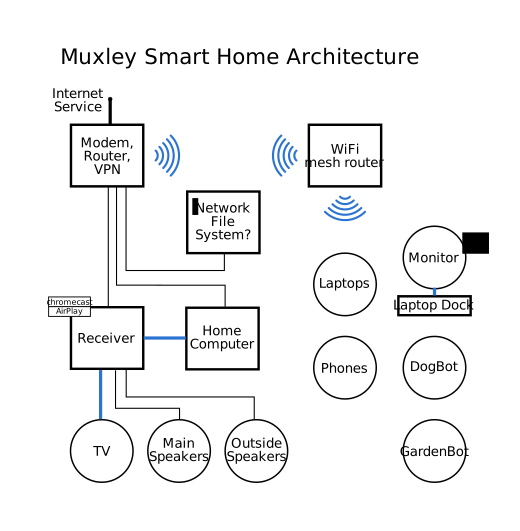
Project 0: VPN into the home network
It starts at the provider <-> modem <-> router interface
What do we need to know about this?
First google of “setting up home vpn” turns of links that state it takes 17 min! Half the links are promising too. Most are about how to use a VPN service provider, not how to set up a home VPN. But! There’s this nifty instructables:
http://www.instructables.com/id/Host-Your-Own-Virtual-Private-Network-VPN-with-O/
It recommends starting with this earlier home cloud one:
http://www.instructables.com/id/How-Access-your-Media-from-Anywhere-by-Hosting-you/
This looks like a better all-around guide:
https://www.howtogeek.com/221001/how-to-set-up-your-own-home-vpn-server/
VPN router and network address translation: what can I do?
We have a Motorola MG7310. Looks like firmware is automatically pushed to the router: there’s no direct way to mod the router
Here’s the User Guide:
- Local
/archive/MG7310-UserManual.pdf - Link http://motorolacable.com/support/MG7310/
- Local
Upload speed of our internet provider supposetly really matters for home VPN: our service is Spectrum “Extreme” Internet.
On 2017-09-15 at 22:31 I recorded a download speed of 2.28 Mbit/s and upload of 4.00 Mbit/s.
I immediately (on a whim) upgraded to the Spectrum “Extreme 100” Internet. On 2017-09-15 at 22:39 I recorded a download speed of 45 MBit/s and upload of 11.71 Mbit/s. Woot
(This cost +$10/mo for a total of $55/mo. Looks like its a year contract?)
Speedtests were run with (
pip install speedtest-cli) over wifiMight want to get a hostname/ddns service. noip.com. Only look into this after testing stuff out and seeing how critical mobile/vpn access is. http://freedns.afraid.org/
MuxleyRouterbot
- Need an off the shelf tunnel type connection to get to the routerbot
- I think I still have the dd-wrt router: that can be my mesh testbed. Try and get a camera connected and accessible
- This looks pretty awesome: using an old android phone sounds like a nifty idea as well: http://www.robotshop.com/en/4wd-remote-control-robot-kit-android-compatible.html
Should really connect the Command and Control computer to the router over ethernet. That might be a project for tomorrow. Need cable to route under the house
Tangents
- Set up a wireless mesh in the home network
- Make the home network talk securely
- Make the mesh keep logs and forward them to a data server
- Add gpio to the mesh
- Connect the mesh to a rc platform
- Add a local authentication system
- Control these with puppet?
- Control stereo (A and B channels) over internet. Get airplay working again? More cable routing?
Buying Stuff
Laptop
Dell XPS 13 Developer Edition: $849.99
http://www.techradar.com/reviews/dell-xps-13-9360-developer-edition
oOo ThinkPad T470, IBM keyboard, extended battery, from $873!
https://www.laptopmag.com/articles/all-day-strong-longest-lasting-notebooks
It would be Good to look into docking stations as well
It would be nice to see if I can hook into the SpaceX network with a home laptop
Need to look at state of Brandy’s laptop as well
Server
Looking at a server, these links seem interesting:
Rasperry Pi
rasperry pi’s have a big community and i/o support out of the box, I’ve found projects for security cams, wifi commandable rovers, and gardenbot all with rasperry pi code!